
Learning player
Watch lessons, mark progress, join live meetings, and take quizzes inside a confirmed course.
The learning player is not in the sidebar. Open it with Open on a confirmed or completed course (dashboard card or My Courses).
URL: /student/explore/{course}/{lesson?}. If you omit the lesson, the first incomplete lesson is selected.
Staff preview and a legacy /student/learn/courses/{course}/{lesson?} URL redirect students into the same Filament explorer.
You need a Confirmed or Completed enrollment for that course (or a staff preview). Pending enrollments cannot open paid lessons.
Playlist
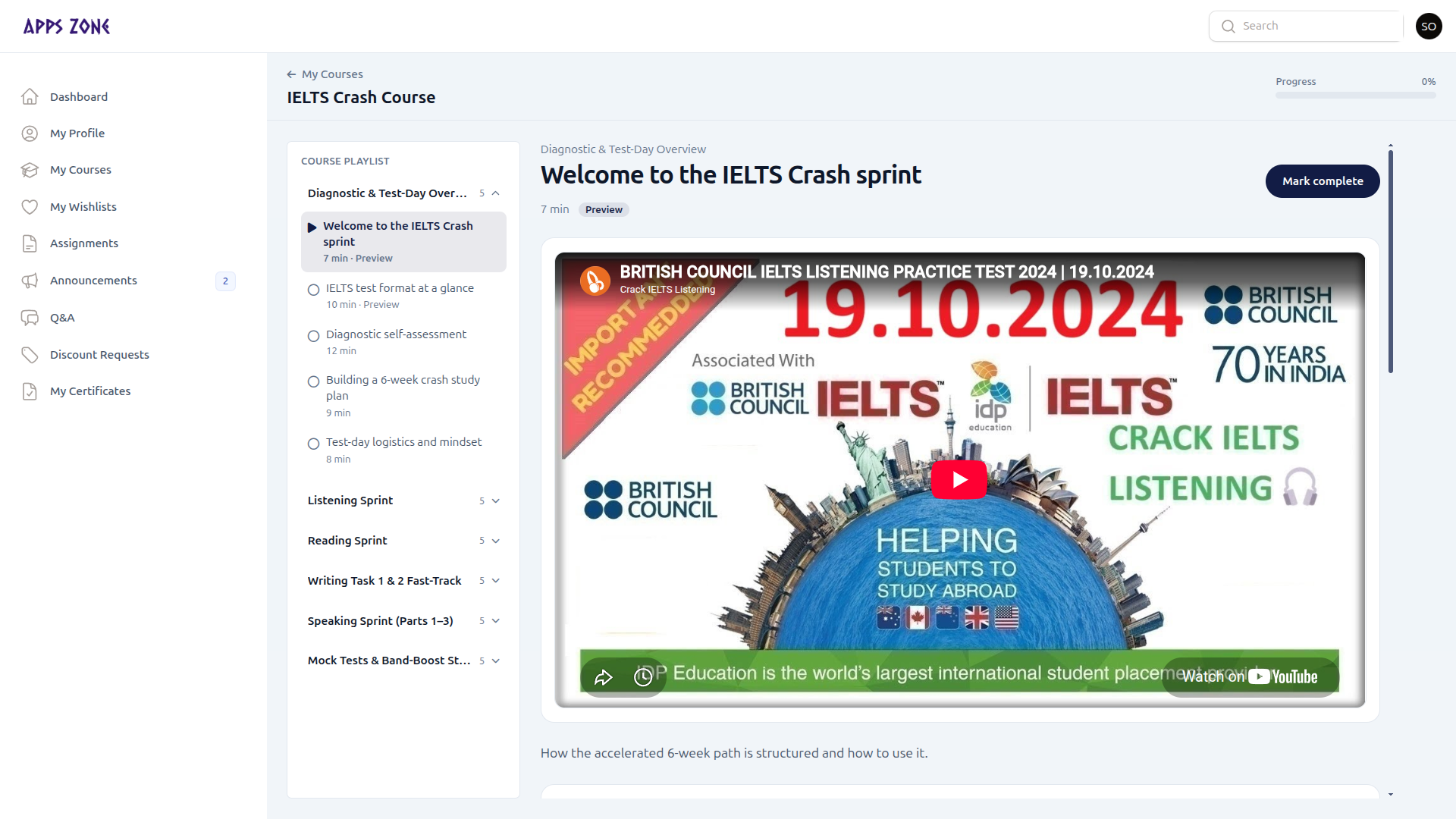
The left column lists modules and lessons. The current lesson is highlighted; completed lessons show a check. Preview and live-meeting lessons are labelled.
Progress percent is the share of lessons you have marked complete.
My Courses in the top bar returns to /student/enrollments.
Lesson pane
Depending on the lesson type you will see:
- Video (when the lesson has video content)
- Written content / summary
- Mark complete (hidden once done; meeting-only lessons complete when you join)
- Join meeting when a live session is attached and the join window is open
Assignments and quizzes on the lesson
Assignments and quizzes attached to the course appear in the explorer so you can submit without leaving the player. You can also work assignments from the Assignments sidebar (same submissions).